RAPFRAME · PHOTO TO VIDEO
Make a Thriller Dance video from your photos
Create a 15-second Halloween dance from one photo of a dancer or group, guided by the included video. Output is silent.
What this template is for
An included motion-reference video guides this new performance. Your photos provide the subjects. It is reference-guided generation, not a guaranteed frame-for-frame copy.
How to make your video
Open and check the template
Preview the available material and check which photo slots are required. The page labels references and historical examples separately.
Assign your photos
Add the photos in the labeled order and finish uploading. Start with the included direction; no prompt writing is required.
Check the cost and generate
Review the settings and credits, then generate once. Follow the saved job in My videos and review the entire MP4 before downloading.
Archived example
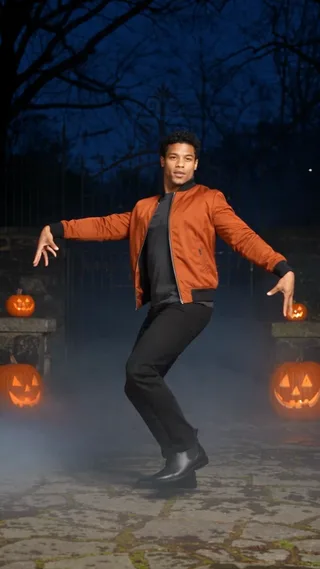
A historical Thriller Dance example
This is an archived Vismuse demonstration from an earlier workflow, not a current Rapframe generation or a customer testimonial. Its measured file properties describe this archive only. The original input is not verified here unless explicitly shown.
Archived video file: 15.042 seconds · 480 × 854 px.
No measured generation-time or success-rate benchmark is available for the current Rapframe workflow on this page.
Sound and result limits
This template produces a silent video. The historical demonstration may contain a soundtrack; no original song or separate soundtrack is added to your generated video.
Identity, anatomy, details and timing can vary. The example is not a promise of a particular result. No measured generation-time or success-rate claim is made here.
Check these before trying again
The subject looks different
Try a sharper photo that clearly shows the intended subject. Appearance, hands, feet and motion can still vary; another generation uses credits.
The job is still processing
Follow the existing job in My videos. Do not submit another paid job just to check progress. A confirmed failed generation returns its reserved credits.
I want another version
Use only the choices listed on this page and in the studio. Check the changed photo roles, duration and credit total before another generation.
Questions before generating
How many photos do I need?
1 required. Match each image to its labeled photo slot. Use separate clear images for separate slots.
Which length and format can I choose?
Available lengths: 15 seconds. Video ratios: 9:16. Default settings: 15 seconds · 9:16.
What sound is included?
This template produces a silent video. The historical demonstration may contain a soundtrack; no original song or separate soundtrack is added to your generated video.
What does Thriller Dance keep or change?
An included motion-reference video guides this new performance. Your photos provide the subjects. It is reference-guided generation, not a guaranteed frame-for-frame copy. Dancer or group in one photo: Upload one clear full-body photo of a dancer or a group. Keep every dancer’s face, hands and feet visible.
Do I need a prompt or reference video?
No prompt is required: the template includes direction. You can add optional instructions, but they cannot guarantee exact motion, identity or a particular soundtrack.
Can I change the version or cast?
Use the studio choices listed above. Optional photo slots and version choices affect the cast; review them before paying. The scene still generates a new result.
Is Thriller Dance free or subscription-based?
Previewing an example does not generate your own video. Generation requires paid credits from a one-time pack. Signup does not grant free generation credits. No subscription or automatic renewal is required.
How long will generation take?
There is no measured time estimate for this current workflow. Follow the existing job in My videos instead of resubmitting while it is processing.
Are my photos and videos public?
Your uploads and generated videos are private to your account. A temporary playback link can also open them while valid, so do not share it unintentionally. They are not automatically published as examples.