 Rapframe
AI Red Riding Hood Video Generator
Create an AI Red Riding Hood video from one photo: a red cape, a snowy forest, grey wolves and a hood-down face reveal in a 15-second landscape scene.
Create my video
Upload your photos to use this template.
Pick an effect
All 235 effects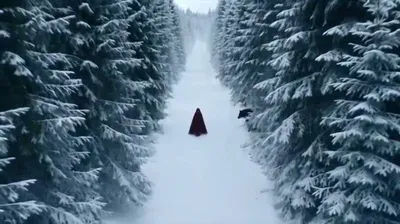











Enable JavaScript in your browser to upload material and generate a video.
Paid credits required. Check the cost before generating.
Preview unavailable. Try again.
What happens in this video?
The AI Red Riding Hood with wolves effect begins with a distant red figure on a snowy pine-forest road. The lead walks toward the camera alongside a calm pack of grey wolves, then lowers the hood for a clear face reveal. The cape, snow and gradual approach give the scene its storybook mood. Your photo supplies the lead identity throughout, including before the hood comes down. This is a moving fantasy scene, rather than a red-cape photo filter or a static portrait.
Your photos and the prepared scene
Upload one person or pet. The prepared video supplies the walk, accompanying wolves, camera progression and hood-reveal timing; the uploaded photo supplies the lead’s identity. A red hooded cape is added as the scene costume, over the subject’s own outfit where applicable. The wolves remain distinct supporting animals. No reference-video upload is needed.
Choose photos for the right roles
Choose one clear photo with an unobstructed face and visible upper body. Avoid an existing hood that hides the hair or eyes, strong beauty filters and group photos. A front or three-quarter view gives the reveal useful facial detail. For a pet, keep the whole face, ears and body visible.
Create my video
Add your photos
Choose one clear photo with an unobstructed face and visible upper body. Avoid an existing hood that hides the hair or eyes, strong beauty filters and group photos. A front or three-quarter view gives the reveal useful facial detail. For a pet, keep the whole face, ears and body visible.
Personalize the scene
Upload one person or pet. The prepared video supplies the walk, accompanying wolves, camera progression and hood-reveal timing; the uploaded photo supplies the lead’s identity. A red hooded cape is added as the scene costume, over the subject’s own outfit where applicable. The wolves remain distinct supporting animals. No reference-video upload is needed.
Generate and download
Check the credit cost, generate, then inspect faces, hands and transitions before downloading. New generations and revisions use credits.
Questions about this effect
Which photos should I upload?
Choose one clear photo with an unobstructed face and visible upper body. Avoid an existing hood that hides the hair or eyes, strong beauty filters and group photos. A front or three-quarter view gives the reveal useful facial detail. For a pet, keep the whole face, ears and body visible.
Do I need to upload a reference video?
Upload one person or pet. The prepared video supplies the walk, accompanying wolves, camera progression and hood-reveal timing; the uploaded photo supplies the lead’s identity. A red hooded cape is added as the scene costume, over the subject’s own outfit where applicable. The wolves remain distinct supporting animals. No reference-video upload is needed.
Does the video include sound?
With sound enabled, the matching audio is extracted from the prepared video and added after silent visual generation. A silent request leaves it out. Exact beat alignment can vary.
How long is the video?
One 15-second 16:9 MP4. Check the face, body movement and scene continuity before downloading. New generations and revisions use credits.
Can I change the outfit or background?
Yes. Add a short instruction about clothing, lighting or the setting. Keep the assigned photo roles for the selected scene.