 Rapframe
Ain’t No Mountain High Enough AI Subway Singing
Earphones in, eyes closed and one hand lifted for the big note. Put the person in your photo into the subway singing scene without recording a performance.
Make your Ain’t No Mountain High Enough AI video
Upload your photos to use this template.
Pick an effect
All 235 effects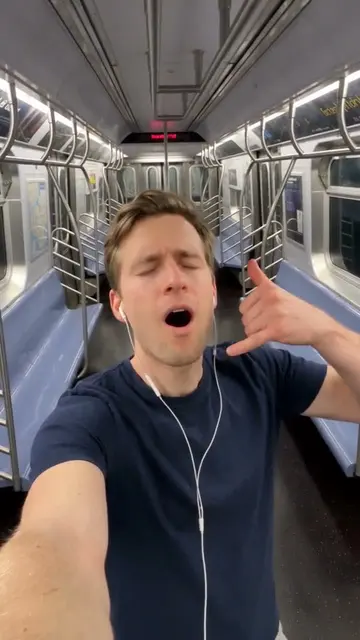











Enable JavaScript in your browser to upload material and generate a video.
Paid credits required. Check the cost before generating.
Preview unavailable. Try again.
What does the Ain’t No Mountain High Enough AI video look like?
The Ain’t No Mountain High Enough AI trend gives an ordinary train ride the energy of a private concert. The featured adult sits in an almost empty subway carriage, sings toward a close camera and leans into the chorus with an upward gesture. The contrast between an everyday commute and a wholehearted performance makes the scene recognizable. Create a short reaction for friends, a post for your favourite commute song or a playful portrait of someone who sings everywhere.
How your photo becomes the performance
Your photo provides the singer’s face, hair and clothing. The included reference guides the eyes closing, chin lifting, raised-hand gesture and selfie-like camera framing. The subway interior and wired earphones complete the default scene. You only provide the portrait and any optional instruction; there is no singing recording or video upload to prepare.
Photo tips for this template
Use a well-lit chest-up or waist-up photo of one adult, facing the camera. Keep the eyes, mouth and hair visible, and include some clothing. Avoid sunglasses, face-covering hands and tightly cropped selfies that leave little room for expression.
Make your Ain’t No Mountain High Enough AI video
Add your photos
Upload one clear adult portrait. Pick a photo with a readable expression and the outfit you would like the singer to wear.
Personalize the scene
Leave instructions empty for the subway scene or request a small clothing or lighting change. Keep the earphones and raised-hand moment for the familiar effect.
Generate and download
Check the credit cost before generating. Review the face, hand and mouth movement in the 10-second 9:16 MP4, then listen to the final audio before downloading.
Questions about this video
How many photos do I need?
One photo of one adult. This version has one featured subway singer; it does not require a partner photo or offer a separate pet mode.
Do I need to upload a reference video?
No. The scene and movement are already included. Upload the required photos and add optional instructions.
Does the video include sound?
The matching soundtrack is added when sound is enabled. Request a silent video to leave it out.
How long is the video?
A 10-second vertical 9:16 video, suitable for a short performance post. It does not create a full-song cover or a new recording of your voice.
Can I change the outfit or background?
Yes. Add a short instruction about clothing, lighting or the setting. Keep the assigned photo roles for the selected scene.