 Rapframe
Ballon d’Or AI: Put Yourself on the Awards Stage
Make a Ballon d’Or AI video from one photo. Walk onto the stage, receive a golden football trophy and celebrate under confetti. Add your own outfit and scene instructions.
Create my video
Upload your photos to use this template.
Pick an effect
All 235 effects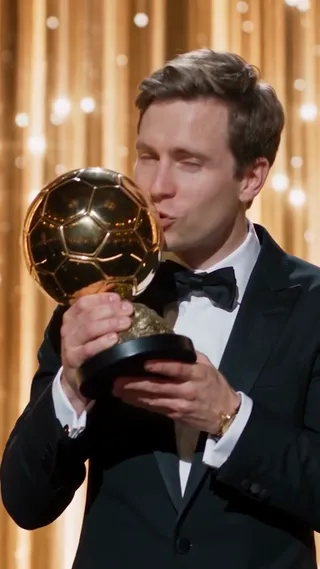











Enable JavaScript in your browser to upload material and generate a video.
Paid credits required. Check the cost before generating.
Preview unavailable. Try again.
What happens in this video?
Begin among the guests at a glamorous football awards night, stand up and walk to the presenter. Take a golden football trophy with both hands, smile for the cameras and lift it as gold confetti falls. The same uploaded face stays visible from the audience to the final trophy close-up.
Your photos and the prepared scene
Your photo defines the award recipient. A fixed written sequence creates the audience, walk, trophy handoff and celebration; no video, storyboard or original audio is sent to the model. Add clothing or setting requests in the optional instructions.
Choose photos for the right roles
Upload one sharp adult portrait, ideally showing the upper body. A clear face and visible hair help across the audience, walking and stage shots. Avoid group photos or sunglasses.
Create my video
Add your photos
Upload the photos described above in the correct order. Keep every face sharp and unobstructed.
Personalize the scene
Keep the prepared scene or add a short instruction about clothing, lighting or setting. Review the selected settings.
Generate and download
Check the credit cost, generate, then inspect faces, hands and transitions before downloading. New generations and revisions use credits.
Questions about this effect
Which photos should I upload?
Upload one sharp adult portrait, ideally showing the upper body. A clear face and visible hair help across the audience, walking and stage shots. Avoid group photos or sunglasses.
Do I need to upload a reference video?
Your photo defines the award recipient. A fixed written sequence creates the audience, walk, trophy handoff and celebration; no video, storyboard or original audio is sent to the model. Add clothing or setting requests in the optional instructions.
Does the video include sound?
When sound is enabled, the model creates audience applause, camera clicks and an original celebratory instrumental. No original ceremony recording or song is attached. Request silence to remove sound.
How long is the video?
One 12-second vertical 9:16 MP4. Individual gestures, hands and facial consistency can vary.
Can I change the scene or outfit?
Yes. Add a short styling or setting request while retaining the assigned roles and main action sequence. Review the result for unintended changes.