 Rapframe
Fergie Baby AI
Make a Fergie Baby AI dance video from one photo. Keep your own look while performing the forward strut, shoulder groove and park-path footwork.
Make your Fergie Baby video
Upload your photos to use this template.
Pick an effect
All 235 effects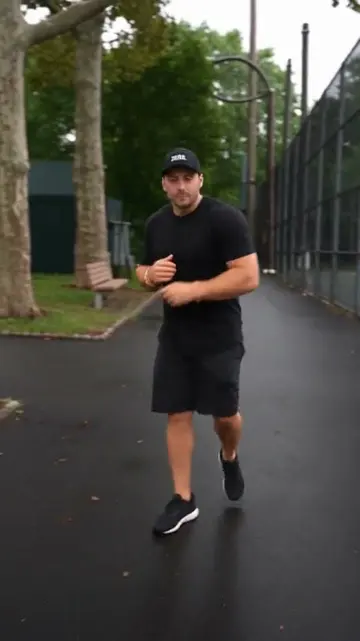











Enable JavaScript in your browser to upload material and generate a video.
Paid credits required. Check the cost before generating.
Preview unavailable. Try again.
What is Fergie Baby AI?
The Fergie Baby dance is a forward-moving walking routine: a confident strut, loose shoulders, swinging arms and rhythmic changes of weight. The camera moves back as the dancer approaches, keeping the steps and body language readable. This template puts the adult in your photo into a 15-second excerpt of that routine. Here Fergie Baby refers to the walking-dance format, not a baby generator or a portrait of the singer’s family.
How your photo becomes the scene
An included 15-second movement excerpt guides the forward steps, alternating arm accents and camera tracking. Your photo supplies the dancer’s identity and outfit. The default setting is a paved park path beside a sports-court fence. The reference is prepared automatically, so you do not need to find or upload a dance video.
Choose the right photo
Choose one well-lit photo of one adult standing, from head to feet. Leave room around both arms and show the shoes clearly: the routine depends on grounded stepping and weight shifts. Face the camera, avoid motion blur, and keep other people out of the photo. Your clothing and hairstyle guide the dancer’s appearance.
Make your Fergie Baby video
Upload one clear photo
Choose one well-lit photo of one adult standing, from head to feet. Leave room around both arms and show the shoes clearly: the routine depends on grounded stepping and weight shifts. Face the camera, avoid motion blur, and keep other people out of the photo. Your clothing and hairstyle guide the dancer’s appearance.
Add a focused instruction
Leave instructions empty to use the prepared park-path dance, or request a change to the location, lighting or outfit. For example: “Keep my white sneakers and move the dance to a sunny courtyard.” Keep the walking dance in the request if you want to preserve the reference action.
Generate, review and download
Review the displayed credit cost before submitting. The template creates one 15-second vertical 9:16 MP4. Check the face, hands, movement and audio after generation, then download the result. You can request a revision in the same conversation; each new completed generation uses credits.
Fergie Baby questions
How many photos do I need?
Upload one full-body photo of one adult. There is one featured dancer, so no second photo or partner is needed. A photo that clearly shows both feet gives the model more information for the walking steps.
Do I need to upload the original video?
An included 15-second movement excerpt guides the forward steps, alternating arm accents and camera tracking. Your photo supplies the dancer’s identity and outfit. The default setting is a paved park path beside a sports-court fence. The reference is prepared automatically, so you do not need to find or upload a dance video.
Does the result include audio?
The matching 15-second source audio is added after video generation when sound is enabled, replacing any model-produced sound. If you request a silent version, the final export omits the soundtrack. Mouth timing and movement are AI-generated and may not align perfectly.
How long is the video?
This template makes a 15-second vertical 9:16 MP4. The reference preview shows a longer routine; generation uses the first 15-second excerpt. It does not create the entire preview.
Can I change the background or outfit?
Yes. Add a focused instruction with your photo, or ask for a revision in the same conversation. Your photo defines the featured person, and the prepared motion reference guides the scene. Large changes can reduce action fidelity; check the result before sharing. Exact likeness, choreography and lip synchronization are not guaranteed.