 Rapframe
Grease Dance AI: Your Carnival Couple Dance
Create a Grease-inspired dance video from two photos. Dress in retro black outfits, strut, turn and swing together at a dusk carnival. Add your own scene instructions.
Create my video
Upload your photos to use this template.
Pick an effect
All 235 effects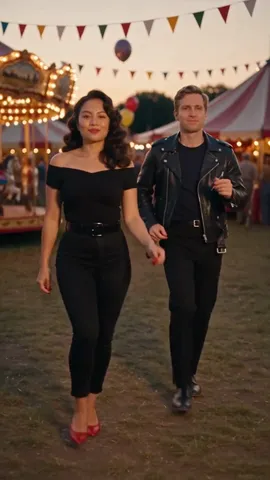











Enable JavaScript in your browser to upload material and generate a video.
Paid credits required. Check the cost before generating.
Preview unavailable. Try again.
What happens in this video?
Two familiar faces take the lead in a playful 1950s-style carnival dance. Start with a confident walk, trade a shoulder shimmy and a point, turn hand in hand, then finish with a side-to-side swing and a smile. The 10-second sequence is written into the template, so no dance recording is required.
Your photos and the prepared scene
The photos define two separate identities, not opening frames. Fixed directions supply the costumes, carnival and dance sequence. No reference video, storyboard or song recording goes to the model. Add a clothing or background request to override the default styling without swapping identities.
Choose photos for the right roles
Upload two adult photos in order. Photo 1 takes the off-shoulder black top, black trousers and red shoes; photo 2 takes the black leather jacket and dark trousers. Either person can play either role. Swap the upload order to swap roles. Knees-up or full-body images with clear faces work best; avoid group photos, sunglasses and hands covering the face.
Create my video
Add your photos
Upload the photos described above in the correct order. Keep every face sharp and unobstructed.
Personalize the scene
Keep the prepared scene or add a short instruction about clothing, lighting or setting. Review the selected settings.
Generate and download
Check the credit cost, generate, then inspect faces, hands and transitions before downloading. New generations and revisions use credits.
Questions about this effect
Which photos should I upload?
Upload two adult photos in order. Photo 1 takes the off-shoulder black top, black trousers and red shoes; photo 2 takes the black leather jacket and dark trousers. Either person can play either role. Swap the upload order to swap roles. Knees-up or full-body images with clear faces work best; avoid group photos, sunglasses and hands covering the face.
Do I need to upload a reference video?
The photos define two separate identities, not opening frames. Fixed directions supply the costumes, carnival and dance sequence. No reference video, storyboard or song recording goes to the model. Add a clothing or background request to override the default styling without swapping identities.
Does the video include sound?
With sound enabled, the model creates original upbeat rock-and-roll-style instrumental music and soft fairground ambience. The film song and competitor recording are not included. Request silence for a muted result.
How long is the video?
One 10-second vertical 9:16 MP4. Check both faces, joined hands, feet and the turn before downloading; generated movement and likeness can vary.
Can I change the scene or outfit?
Yes. Describe the outfit, lighting or setting you want, while keeping photo 1 and photo 2 in their assigned roles. User instructions take priority over the default retro styling.