 Rapframe
I Thought We Were Having A Nice Date AI: A Dinner That Turns Dramatic
Two people sit across a dim restaurant table. One goes from laughing to standing up and crying, while their date tries to calm them down. One vertical 9:16 MP4, about 15 seconds long. Individual movements and facial consistency can vary.
Create my video
Upload your photos to use this template.
Pick an effect
All 235 effects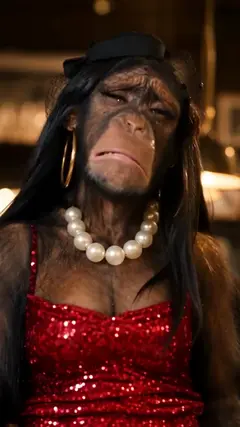











Enable JavaScript in your browser to upload material and generate a video.
Paid credits required. Check the cost before generating.
Preview unavailable. Try again.
What happens in this video?
Two people sit across a dim restaurant table. One goes from laughing to standing up and crying, while their date tries to calm them down. This version focuses on the final 15-second part of that comic breakdown, with separate photos for the emotional lead and the seated date.
Your photos and the prepared scene
The movement and camera sequence are prepared for you. Your photos define the featured identities; the reference guides action order, expressions, framing and camera timing. Add optional instructions for clothing, light or location. You do not need to upload a reference video.
Choose photos for the right roles
Upload two separate adult photos. Photo 1 is the person who stands and cries; photo 2 is the date who stays seated. Keep each face clear and avoid two crops of the same person. The preview uses animals, but this workbench is configured for two adults.
Create my video
Add your photos
Upload the photos described above in the correct order. Keep every face sharp and unobstructed.
Personalize the scene
Keep the prepared scene or add a short instruction about clothing, lighting or setting. Review the selected settings.
Generate and download
Check the credit cost, generate, then inspect faces, hands and transitions before downloading. New generations and revisions use credits.
Questions about this effect
Which photos should I upload?
Upload two separate adult photos. Photo 1 is the person who stands and cries; photo 2 is the date who stays seated. Keep each face clear and avoid two crops of the same person. The preview uses animals, but this workbench is configured for two adults.
Do I need to upload a reference video?
The movement and camera sequence are prepared for you. Your photos define the featured identities; the reference guides action order, expressions, framing and camera timing. Add optional instructions for clothing, light or location. You do not need to upload a reference video.
Does the video include sound?
When sound is enabled, the matching prepared excerpt is restored after video generation. Request silence to omit it. The workbench does not create a new song or promise exact lip sync.
How long is the video?
One vertical 9:16 MP4, about 15 seconds long. Individual movements and facial consistency can vary.
Can I change the scene or outfit?
Yes. Add a short styling or setting request while retaining the assigned roles and main action sequence. Review the result for unintended changes.