 Rapframe
Jatayu Video Prompt
Turn one photo into a Jatayu video. A giant eagle rises behind you and spreads its wings over a stone terrace at sunset.
Make your Jatayu video
Upload your photos to use this template.
Pick an effect
All 235 effects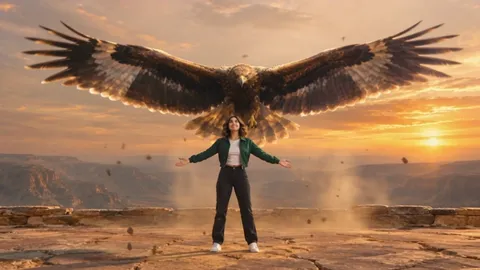











Enable JavaScript in your browser to upload material and generate a video.
Paid credits required. Check the cost before generating.
Preview unavailable. Try again.
Jatayu Edit AI
The Jatayu edit takes its name from the giant bird in the Ramayana. In this version you stand on a sandstone terrace overlooking a canyon as an eagle rises behind you and beats its wings.
Rapframe-generated example
The Jatayu edit takes its name from the giant bird in the Ramayana. In this version you stand on a sandstone terrace overlooking a canyon as an eagle rises behind you and beats its wings.
Add your photos
Upload one well-lit photo of one adult. A front-facing, full-body photo with your face and outfit visible works best.
Make your Jatayu video
Add your photos
Upload one well-lit photo of one adult. A front-facing, full-body photo with your face and outfit visible works best.
Personalize the scene
Keep the sunset terrace or add an optional note about the lighting or scenery.
Generate and download
Check your face, outfit and the eagle's entrance, then download the clip.
Questions about this video
Add your photos
Upload one well-lit photo of one adult. A front-facing, full-body photo with your face and outfit visible works best.
Do I need to upload a reference video?
No. The scene and movement are already included. Upload the required photos and add optional instructions.
Does the video include sound?
The matching soundtrack is added when sound is enabled. Request a silent video to leave it out.
How long is the video?
The widescreen clip runs about six seconds.
Can I change the outfit or background?
Yes. Add a short instruction about clothing, lighting or the setting. Keep the assigned photo roles for the selected scene.