 Rapframe
KATSEYE Animal AI
Make a short You Move Like an Animal dance video with your own three-person cast. Upload the centre, left and right dancers in order, then add any outfit or setting details.
Make your KATSEYE Animal video
Upload your photos to use this template.
Pick an effect
All 235 effects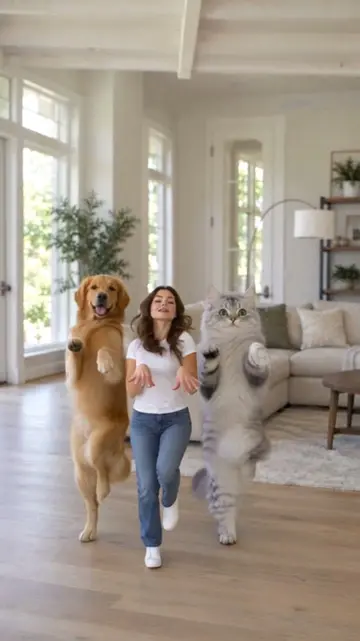











Enable JavaScript in your browser to upload material and generate a video.
Paid credits required. Check the cost before generating.
Preview unavailable. Try again.
What is KATSEYE Animal AI?
The KATSEYE Animal trend puts a small dance crew in a front-facing formation with coordinated shoulder pulses, hip shifts, hand gestures and turns. This version makes a 10-second excerpt with three uploaded identities, keeping each dancer in a distinct role.
How the scene is directed
The included movement reference supplies choreography, pacing and camera movement. Your three photos define the cast. You do not need to upload a video. This is a short excerpt, rather than a full-length music video.
Choose the right photos
Upload three separate, sharp photos, one adult person or one pet per photo. Photo 1 is the centre lead, photo 2 the dancer on the viewer’s left, and photo 3 the dancer on the viewer’s right. Show the face, body and outfit clearly; avoid group photos and heavily cropped limbs.
Make your KATSEYE Animal video
Upload your photos
Upload three separate, sharp photos, one adult person or one pet per photo. Photo 1 is the centre lead, photo 2 the dancer on the viewer’s left, and photo 3 the dancer on the viewer’s right. Show the face, body and outfit clearly; avoid group photos and heavily cropped limbs.
Add optional instructions
Keep the included scene or add a focused change to the outfit, expression, setting or energy. The default is a 10-second vertical video.
Generate and review
Check the displayed credit cost, generate, then review identity and movement before downloading the MP4. A new generation uses credits.
KATSEYE Animal AI questions
How many photos do I need?
Upload 3 separate photo(s). Photo 1: centre dancer, Photo 2: left dancer, Photo 3: right dancer.
Do I need to upload a reference video?
The included movement reference supplies choreography, pacing and camera movement. Your three photos define the cast. You do not need to upload a video. This is a short excerpt, rather than a full-length music video.
Is the original song included?
No original song recording is bundled. Sound is newly generated ambience and music or effects. Select silent output if you prefer.
How long is the video?
This template creates a 10-second vertical 9:16 MP4. It is a short interpretation of the scene, not the complete original video.
Can I change the scene, and will the action match exactly?
Add a focused instruction before generating or request a revision in the same chat. AI movement and facial detail can vary; exact choreography and likeness are not guaranteed. Revisions use credits.