 Rapframe
Mom Dad Sister Brother AI: Give Your Whole Heart
A tiny heart for Mom, another for Dad, then Sister—and a whole heart for Brother. This family gesture video turns one adult photo into a lighthearted performance. One vertical 9:16 MP4, about 10 seconds long. Individual movements and facial consistency can vary.
Create my video
Upload your photos to use this template.
Pick an effect
All 235 effects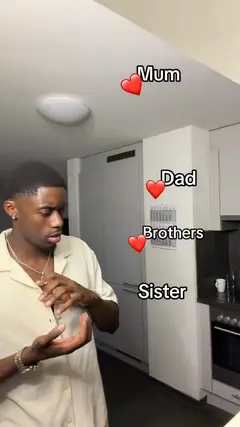











Enable JavaScript in your browser to upload material and generate a video.
Paid credits required. Check the cost before generating.
Preview unavailable. Try again.
What happens in this video?
A tiny heart for Mom, another for Dad, then Sister—and a whole heart for Brother. This family gesture video turns one adult photo into a lighthearted performance. The person picks small glowing heart icons from one palm and flicks them toward the family names. The final oversized heart is a graphic symbol, with no wound or realistic organ.
Your photos and the prepared scene
The performance is generated from your photo and a fixed written sequence. No video, storyboard or original recording is sent as a reference. The optional instructions are appended to the scene. Heart shapes, labels and gesture timing can vary; check them before sharing.
Choose photos for the right roles
Use one clear adult photo with the face, upper body and both hands visible. A simple background gives the heart graphics and family names more room. Group photos and hands over the face are less suitable.
Create my video
Add your photos
Upload the photos described above in the correct order. Keep every face sharp and unobstructed.
Personalize the scene
Keep the prepared scene or add a short instruction about clothing, lighting or setting. Review the selected settings.
Generate and download
Check the credit cost, generate, then inspect faces, hands and transitions before downloading. New generations and revisions use credits.
Questions about this effect
Which photos should I upload?
Use one clear adult photo with the face, upper body and both hands visible. A simple background gives the heart graphics and family names more room. Group photos and hands over the face are less suitable.
Do I need to upload a reference video?
The performance is generated from your photo and a fixed written sequence. No video, storyboard or original recording is sent as a reference. The optional instructions are appended to the scene. Heart shapes, labels and gesture timing can vary; check them before sharing.
Does the video include sound?
When sound is enabled, the model creates fresh room sounds and a light original backing track. No original song is attached. Ask for a silent version to remove sound.
How long is the video?
One vertical 9:16 MP4, about 10 seconds long. Individual movements and facial consistency can vary.
Can I change the scene or outfit?
Yes. Add a short styling or setting request while retaining the assigned roles and main action sequence. Review the result for unintended changes.