 Rapframe
Make the Mulmannan Gwangeo Dance From Your Photo
One solo or group photo becomes a playful floor-dance scene. Keep your cast and ask for synchronized hand-and-foot lifts with a gently moving camera.
Make my Gwangeo dance
Upload your photos to use this template.
Pick an effect
All 235 effects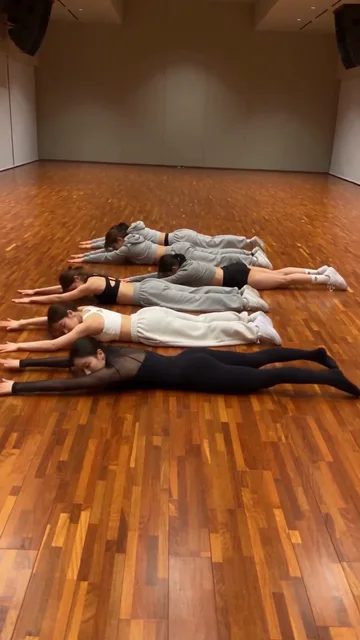











Enable JavaScript in your browser to upload material and generate a video.
Paid credits required. Check the cost before generating.
Preview unavailable. Try again.
What is the Mulmannan Gwangeo dance?
물만난 광어 춤, also written 물만난광어춤, is a prone flopping dance. The abdomen and pelvis stay on the floor while both hands and both feet lift and lower together in a repeating rhythm. This template makes a new AI interpretation with the people in your photo.
One photo defines the whole cast
Upload a solo photo for one dancer, or a group photo for the same group dancing together. The photo defines identities and clothing. Written instructions guide the movement and camera; you do not need a dance video or storyboard. The default is a simple dance studio.
Choose a clear solo or group photo
Use a solo image or a group image. The reference defines the subjects; the prompt describes the dance. Clear subjects and visible limbs can help the result, but you do not need a special pose or separate photo for each subject.
Make my Gwangeo dance
Add your photos
Use a solo image or a group image. The reference defines the subjects; the prompt describes the dance. Clear subjects and visible limbs can help the result, but you do not need a special pose or separate photo for each subject.
Personalize the scene
Describe a studio, stage or another setting, or ask to retain the environment visible in your photo. The default camera gently moves sideways and pushes in. Movement, group synchronization and likeness can vary; frame-perfect reproduction is not guaranteed.
Generate and download
Check the displayed cost, generate and inspect every face, hand, foot and grounded reset before downloading. New generations and revisions use paid credits.
Questions about this video
Can I use a group photo?
Upload a solo photo for one dancer, or a group photo for the same group dancing together. The photo defines identities and clothing. Written instructions guide the movement and camera; you do not need a dance video or storyboard. The default is a simple dance studio.
Do I need to upload a reference video?
Upload a solo photo for one dancer, or a group photo for the same group dancing together. The photo defines identities and clothing. Written instructions guide the movement and camera; you do not need a dance video or storyboard. The default is a simple dance studio.
Is the original song included?
This template exports a silent video and does not include the original song. Add an audio track later in your editor or posting app.
How long is the video?
One 5-second vertical 9:16 MP4. The default generation resolution is 480p; available upgrades follow your plan.
Can I change the outfit or background?
Describe a studio, stage or another setting, or ask to retain the environment visible in your photo. The default camera gently moves sideways and pushes in. Movement, group synchronization and likeness can vary; frame-perfect reproduction is not guaranteed.