 Rapframe
Nestle Crunch AI: Your Photo in a Retro Chocolate Ad
The big grin, the dramatic crunch and that worn-tape glow: put your photo into a playful chocolate-commercial scene. One image becomes a 10-second vertical video, with an original jingle when sound is enabled.
Make my Nestle Crunch AI video
Upload your photos to use this template.
Pick an effect
All 235 effects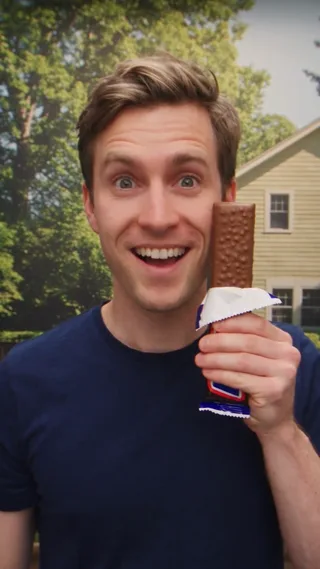











Enable JavaScript in your browser to upload material and generate a video.
Paid credits required. Check the cost before generating.
Preview unavailable. Try again.
What is the Nestle Crunch AI trend?
The Nestle Crunch AI ad trend turns a familiar chocolate-commercial setup into a personalized meme. A cheerful star presents a chocolate bar, reacts with exaggerated delight and looks straight into the camera. Soft VHS texture, warm studio lighting and a simple backyard-style set give the clip its retro character. This template creates a new scene from your photo rather than pasting a face onto an original commercial. For a person, the action centers on one bite and an amused reaction. A pet version uses curious looks and sniffing instead of eating chocolate.
One photo, a prepared scene and an expressive close-up
Your photo defines the face, hairstyle or pet markings. The prepared prompt describes the set, product reveal, expression changes and gentle camera movement, so no reference video or storyboard upload is needed. The scene uses an unbranded wrapper without a logo. Sound is newly generated for the clip: a short instrumental advertising jingle and scene effects, not the original commercial recording. Expressions, hands and sound timing can vary between results.
Choose a clear person or pet photo
Use a sharp photo of one adult or one pet, facing the camera in even light. A chest-up portrait helps preserve the face and outfit. For a pet, show the eyes, muzzle and front paws clearly. Avoid group photos, dark glasses, strong beauty filters and objects covering the mouth. You do not need to hold a chocolate bar in the input image. The pet scene keeps the bar away from the animal’s mouth and shows no eating.
Make my Nestle Crunch AI video
Add your photos
Upload one clear photo of the person or pet you want to feature. Keep the face visible and use a single subject.
Personalize the scene
Use the prepared retro scene or add a short request for clothing, lighting or background. Ask for a silent video if you do not want generated sound.
Generate and download
Check the displayed credit cost, generate and review the face, expressions, product and sound. Download the 10-second vertical MP4. New generations and revisions use credits.
Nestle Crunch AI video questions
How many photos does the Nestle Crunch AI video need?
One photo of one adult or pet. A clear face and a simple composition work best. No photo of a chocolate bar is required.
Do I need to upload a reference video?
No. This template uses your photo and a prepared prompt. You do not need a reference video or storyboard.
Does the video include sound?
With sound enabled, the model creates original ad-style music and effects. It does not add the original commercial’s recording or jingle. Request a silent video to omit sound.
How long is the video?
A 10-second vertical 9:16 MP4. The retro texture is part of the visual style; it is not restored archive footage.
Can I change the outfit or background?
Yes. Add a concise request for clothing, set colors or lighting. Keep the product reveal and playful reaction to retain the ad-meme format. Pets stay animals and do not eat the chocolate.