 Rapframe
The Last Dance AI · Botsu 8 Partner Spin
Make The Last Dance AI trend from two photos. Hold one hand, open the other arm and spin around your partner in an 11-second Botsu 8-style video.
Make my video
Upload your photos to use this template.
Pick an effect
All 235 effects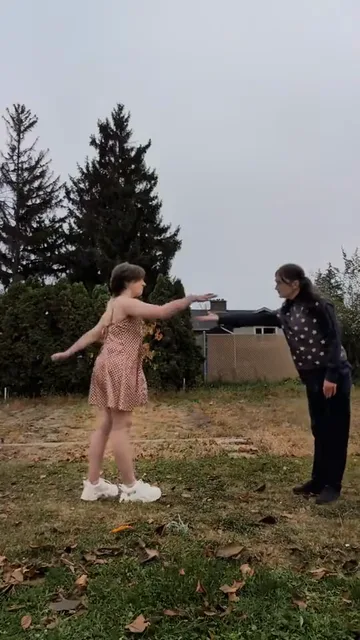











Enable JavaScript in your browser to upload material and generate a video.
Paid credits required. Check the cost before generating.
Preview unavailable. Try again.
What is this video trend?
The Last Dance trend, also searched as Botsu 8, turns a simple partner spin into an expressive duet. Two dancers reach for one hand, extend their free arms and circle each other with light running steps. The connection between the hands is the centre of the scene; the camera keeps both bodies visible as hair and clothing react to the turns.
Your photo, your version
Upload photo 1 for the dancer starting on the left and photo 2 for the dancer starting on the right. These identities remain fixed even when they cross the frame. The included motion clip guides the handhold, footwork and camera. Add a location or outfit request without swapping the roles. Exact hand contact and foot placement may vary.
Choose photos that show the action
Upload two separate full-body photos with one subject in each. Keep faces, hands and shoes visible, and leave room around the arms. Avoid group photos or cropped wrists. Photo 1 starts on the left; photo 2 starts on the right.
Make my video
Add your photos
Upload two separate full-body photos with one subject in each. Keep faces, hands and shoes visible, and leave room around the arms. Avoid group photos or cropped wrists. Photo 1 starts on the left; photo 2 starts on the right.
Personalize the scene
Upload photo 1 for the dancer starting on the left and photo 2 for the dancer starting on the right. These identities remain fixed even when they cross the frame. The included motion clip guides the handhold, footwork and camera. Add a location or outfit request without swapping the roles. Exact hand contact and foot placement may vary.
Generate and download
Review the displayed credit cost, then generate. Check faces, hands, footwork, camera motion and sound before downloading the MP4. New generations and revisions use paid credits.
Questions about this video
Which photos should I upload?
Upload two separate full-body photos with one subject in each. Keep faces, hands and shoes visible, and leave room around the arms. Avoid group photos or cropped wrists. Photo 1 starts on the left; photo 2 starts on the right.
Do I need to upload a reference video?
Upload photo 1 for the dancer starting on the left and photo 2 for the dancer starting on the right. These identities remain fixed even when they cross the frame. The included motion clip guides the handhold, footwork and camera. Add a location or outfit request without swapping the roles. Exact hand contact and foot placement may vary.
Does the video include sound?
The matching soundtrack is added when sound is enabled. Request a silent video to leave it out.
How long is the video?
11 seconds, vertical 9:16 MP4. Matching source sound is optional. Movement and lip synchronization can vary.
Can I change the outfit or background?
Yes. Add a short instruction about clothing, lighting or the setting. Keep the assigned photo roles for the selected scene.