 Rapframe
Window Dance AI — Night Window Dance Video
Create a Window Dance AI video from one person or pet photo: the camera approaches a lit window, your character dances, then notices it and closes the curtain.
Make my video
Upload your photos to use this template.
Pick an effect
All 235 effects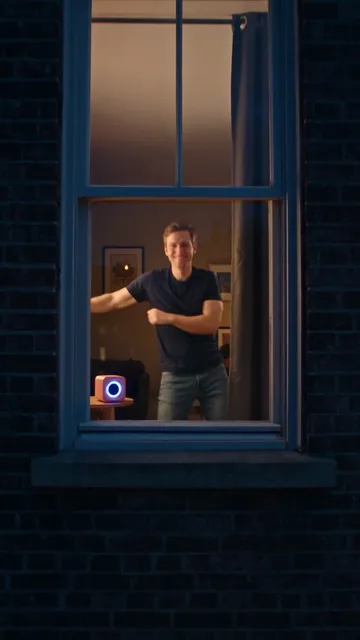











Enable JavaScript in your browser to upload material and generate a video.
Paid credits required. Check the cost before generating.
Preview unavailable. Try again.
What happens in this video?
The camera approaches one bright window in a dark apartment building. Inside, your character dances beside a small speaker, notices the camera, smiles and draws the curtain. Window Dance focuses on this approach, dance and curtain-close sequence. You can use one adult or pet photo. The nighttime room is created around the uploaded identity; the source photo does not need to contain a window.
Your photos define the cast
A fixed written scene guides the action. No motion video is sent to the model.
Choose clear photos
Use one clear adult or pet photo with the face unobstructed. Include the body when possible.
Make my video
Add your photos
Use one clear adult or pet photo with the face unobstructed. Include the body when possible.
Personalize the scene
Leave instructions empty for the prepared scene, or request a focused change to clothing, lighting or the setting.
Generate and download
Review the cost, generate, then check faces, movement and sound before downloading. Revisions use credits.
Questions about this video
How many photos do I need?
Use one clear adult or pet photo with the face unobstructed. Include the body when possible.
Do I need to upload a reference video?
A fixed written scene guides the action. No motion video is sent to the model.
Does the video include sound?
Newly generated sound and music are available; no original song recording is bundled. Request silent output to remove sound.
How long is the video?
10-second vertical 9:16 MP4.
Can I change the outfit or background?
A focused outfit, light or background request can personalize the result. Complex movement and likeness can vary; review the finished video.