 Rapframe
Make an Aeropickles Dance AI Video From a Group Photo
Put your group in the Aeropickles dance challenge. Upload one group photo and see your friends perform the side-to-side aerobics steps and coordinated arm moves in a wide shot.
Make my Aeropickles dance video
Upload your photos to use this template.
Pick an effect
All 235 effects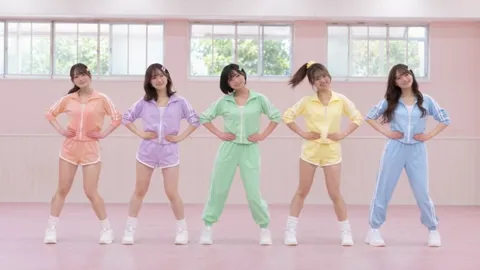











Enable JavaScript in your browser to upload material and generate a video.
Paid credits required. Check the cost before generating.
Preview unavailable. Try again.
What is the Aeropickles dance?
Aeropickles (エアロピクルス) is a song and animated aerobics routine by Komeanime. In the dance practice, five vegetable characters shift their weight from side to side, draw their arms in and open their stance together. Those synchronized moves make the short group cover recognizable.
Which Aeropickles choreography is included?
This template uses the 0:38–0:53 section of the dance practice as the basis for its movement. The sequence starts with hands near the waist, then adds inward arm pulses, wider steps and formation changes.
Choose a group photo with room to dance
Use one well-lit, front-facing group photo. Keep faces, arms and shoes visible, with a little space between people. The example uses five dancers in one image.
Make my Aeropickles dance video
Add your photos
Use one well-lit, front-facing group photo. Keep faces, arms and shoes visible, with a little space between people. The example uses five dancers in one image.
Personalize the scene
Keep our pastel outfits and brighten the dance studio. Keep everyone’s feet in frame.
Generate and download
Preview the group timing and soundtrack, then download your clip.
Questions about this video
Do I need a separate photo of each dancer?
Use one well-lit, front-facing group photo. Keep faces, arms and shoes visible, with a little space between people. The example uses five dancers in one image.
Do I need to upload a reference video?
No. The scene and movement are already included. Upload the required photos and add optional instructions.
Does the video include sound?
The matched 15-second soundtrack is added when sound is enabled. You can also export the clip silent.
How long is the video?
A 15-second landscape MP4 in 16:9.
Can I change the outfit or background?
Yes. Add a short instruction about clothing, lighting or the setting. Keep the assigned photo roles for the selected scene.