 Rapframe
Make the ATEEZ BAD Dance With Your Own Photo
A single dancer performs strong chest accents, a wide stance, side leans and crisp arm hits. Upload one photo to become the lead. The prepared version creates a 10-second 9:16 clip; add optional instructions for your look or setting.
Make my ATEEZ BAD video
Upload your photos to use this template.
Pick an effect
All 235 effects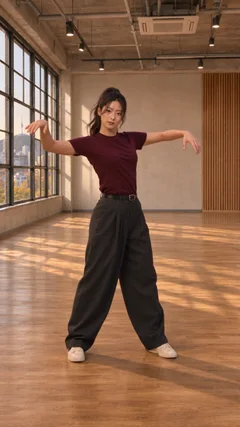











Enable JavaScript in your browser to upload material and generate a video.
Paid credits required. Check the cost before generating.
Preview unavailable. Try again.
What is ATEEZ BAD AI?
The BAD challenge is distinguished by its abrupt chest accents and arm shapes, balanced by short bounces and side leans. This template uses one solo excerpt. Your photo sets the dancer's identity; the included reference provides the movement sequence, pace and camera behavior. The goal is your own character in that routine, rather than an ATEEZ member or a recreated concert stage. This page is for a short dance clip, not an AI song cover, voice clone or complete music video. The full body remains visible so the stance and knee action contribute as much as the upper-body accents.
How your photo becomes this scene
Your photo defines the lead. The prepared movement reference supplies the sequence, tempo and camera. You do not need to find or upload a video. Identity, hand detail and motion can vary; review the result before sharing.
Choose the right photo
Upload one standing adult, head to feet, with the face in clear light. Leave room around the arms for wide hits. A simple background and uncrossed legs make the pose easier to read. Avoid tightly cropped selfies, bags across the chest or additional people.
Make my ATEEZ BAD video
Add your photos
Upload one standing adult, head to feet, with the face in clear light. Leave room around the arms for wide hits. A simple background and uncrossed legs make the pose easier to read. Avoid tightly cropped selfies, bags across the chest or additional people.
Personalize the scene
Leave instructions empty for the prepared scene, or describe a focused change to clothing, light or location. The template already supplies the action.
Generate and download
Check the displayed credit cost before generating. Review the face, role assignment, hands and movement, then download the MP4. Revisions and new generations use credits.
Questions about this video
How many photos do I need?
Upload one clear photo of one adult. Use a full-body photo for dancing, or a clear face-and-shoulders portrait for a close performance or transformation.
Do I need to upload a reference video?
No. The scene and movement are already included. Upload the required photos and add optional instructions.
Does it include the original song?
The soundtrack matching the selected excerpt is added when sound is enabled. Request silent output to leave it out. Review mouth timing and audio before sharing.
How long is the video?
A 10-second vertical MP4 (9:16).
Can I customize it, and will it match exactly?
Add a short instruction for the outfit, light or setting. The core scene and assigned photo roles stay in place. Exact likeness, choreography and lip synchronization are not guaranteed. Review the result before posting.