 Rapframe
C-Walk AI: Make Your Photo Do the Footwork
Quick feet, easy shoulders and your own look. Upload one full-body photo to create a short C-Walk sequence with the shoes and steps clearly in frame.
Make your C-Walk AI video
Upload your photos to use this template.
Pick an effect
All 235 effects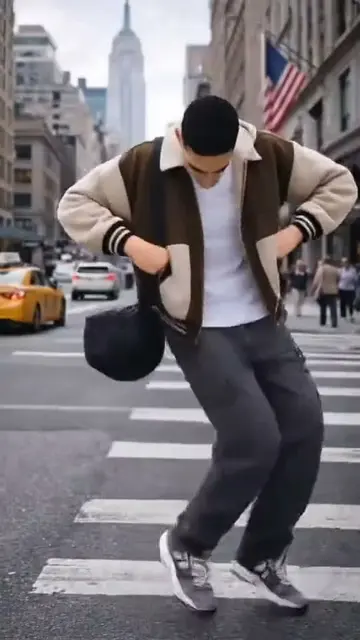











Enable JavaScript in your browser to upload material and generate a video.
Paid credits required. Check the cost before generating.
Preview unavailable. Try again.
What does the C-Walk AI video look like?
C-Walk AI turns a standing portrait into a footwork-led dance clip. Alternating heel and toe positions, V-shaped steps and quick crossovers create the motion, while a looser upper body keeps the performance relaxed. This template follows a prepared movement excerpt so the sequence has a clear rhythm instead of unrelated dance gestures. It is useful for a personal dance post, an outfit-and-sneaker clip or a playful way to put yourself into the trend.
How your photo becomes the performance
The included reference guides the stepping order, weight shifts, balance and camera framing. Your photo supplies the adult dancer’s face, body proportions, clothing and shoes. The default setting comes from the reference; describe a location change in the optional instructions. You do not need to film any dance moves or upload a reference clip yourself.
Photo tips for this template
Use one sharp standing photo from head to shoes. Show both feet, knees and arms with space around the body. Avoid seated poses, tight selfies, crossed legs and blurry footwear. Visible shoes matter more here than they do in a talking-head portrait.
Make your C-Walk AI video
Add your photos
Upload a full-body photo of one adult. Check that neither shoe is cropped out and that the whole figure is clearly separated from the background.
Personalize the scene
Keep the prepared steps and add only the changes you want, such as a courtyard or different lighting. Ask to retain the full-body view so the footwork stays visible.
Generate and download
Check the credit cost and generate the 8-second 9:16 MP4. Review foot placement, body balance and likeness. Download the silent clip and add your chosen music in your editor.
Questions about this video
How many photos do I need?
One full-body photo of one adult, with both shoes visible. This version has one featured dancer and no separate pet option.
Do I need to upload a reference video?
No. The scene and movement are already included. Upload the required photos and add optional instructions.
Does the C-Walk video include music?
No. This C-Walk template always exports a silent video. It does not add the original song, generated music or ambient sound. Add your preferred music after downloading.
How long is the video?
An 8-second vertical 9:16 video. It is a short dance excerpt rather than a complete choreography tutorial.
Can I change the outfit or background?
Yes. Add a short instruction about clothing, lighting or the setting. Keep the assigned photo roles for the selected scene.