 Rapframe
Check One Check Two AI: Put Your Photo in the Rap Meme
The room is crowded, the camera is close, and your character suddenly leans into the frame. Turn one adult portrait into the Check One Check Two rap meme with a wide-eyed stare, head tilts and gestures toward the lens.
Make my Check One Check Two video
Upload your photos to use this template.
Pick an effect
All 235 effects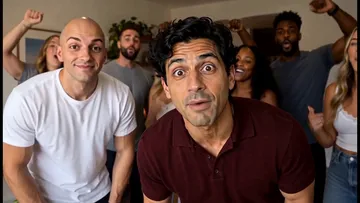











Enable JavaScript in your browser to upload material and generate a video.
Paid credits required. Check the cost before generating.
Preview unavailable. Try again.
What is the Check One Check Two AI trend?
Check One Check Two AI recreates the close-camera rap meme also searched as Check One Two AI or check 1 check 2. The recognizable moment is the entrance: after the surrounding crowd establishes the room, the featured performer leans in from the side and takes over the foreground. Wide-angle perspective makes the face feel unusually close. A direct stare, quick head tilts and hands pointing toward the lens create the playful intensity. This template follows that performance rather than a generic microphone test or a static talking portrait. Your uploaded photo defines the featured adult; the people behind them are supporting characters.
Your photo defines the person; the scene supplies the movement
The prepared motion reference guides the side entrance, handheld camera rhythm, close framing and expressive performance. Your photo supplies the face, hairstyle and clothing. The default scene is a dim, crowded room with onlookers behind the performer. You do not need to find or upload a video, arrange a crowd or describe every gesture. Add one focused instruction to change clothing, lighting or location while keeping the entrance and close-camera energy. Identity, facial expressions and hand motion can vary, so check the result before sharing.
Choose a clear portrait for the close-up
Use one sharp photo of one adult with an unobstructed face. A front-facing or slight three-quarter portrait, framed from the waist or chest up, gives the model useful face and clothing detail. Avoid sunglasses, heavy filters, extreme facial angles and group photos. The input does not need to show a crowd or a microphone. Because the scene comes close to the lens, a clear face matters more than a complex background.
Make my Check One Check Two video
Add your photos
Upload one clear adult portrait with the face and outfit visible. Only the featured performer needs a photo; no crowd photos are required.
Personalize the scene
Keep the prepared room or add a short outfit, lighting or setting request. The movement is included automatically. Output stays 10 seconds in landscape 16:9.
Generate and download
Check the displayed credit cost before generating. Review identity, the side entrance, expressions and hands, then download the silent MP4. New generations and revisions use credits.
Check One Check Two AI video questions
How many photos do I need for Check One Check Two AI?
One clear photo of one adult. Your photo defines the foreground performer. The surrounding crowd is part of the scene and does not require separate uploads.
Do I need to upload a reference video?
No. The prepared performance reference is included automatically. Upload your portrait and add optional instructions; you do not need to upload a rap video.
Does the video include sound?
No. This template exports a silent video without a prepared soundtrack, generated dialogue or voice cloning. Add the sound you want in your editing or publishing app.
How long is the video?
A 10-second landscape 16:9 MP4. This template does not generate a second vertical version in the same request.
Can I change the outfit or background?
Yes. Add a short request for clothing, lighting or location. Keep the side entrance, close lens and expressive gestures to retain the meme. Large changes can affect movement and likeness.