 Rapframe
Walk It Like I Talk It AI Video Generator
Put your crew into the carpool rap scene. Three photos cast the front-passenger lead, driver and back-seat friend, with the performance and music already prepared.
Make your video
Upload your photos to use this template.
Pick an effect
All 235 effects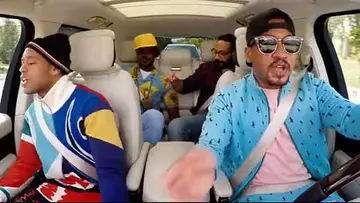











Enable JavaScript in your browser to upload material and generate a video.
Paid credits required. Check the cost before generating.
Preview unavailable. Try again.
What is Walk It Like I Talk It AI?
Walk It Like I Talk It AI recreates the carpool rap format: a dashboard view of friends moving to the rhythm, animated hand gestures and rapid cuts between performers. The front passenger takes the lead while the driver and rear-seat friend join the exchange. This template follows the car-cabin scene rather than a walking routine. Its wide framing keeps the group and their reactions part of the performance.
Your photos, with clear roles
Add the lead front passenger as photo 1, the driver as photo 2 and the friend behind the front passenger as photo 3. In the opening frame, the lead is on screen left and the driver on screen right; cuts change the view but not their roles. An incidental fourth passenger may appear as an anonymous background adult. That extra is not a fourth uploaded role.
Choose photos for the moving scene
Choose three separate adult portraits with sharp faces and visible hair. Chest-up photos help with the car scene’s close views; show the outfit each person should wear. Do not put the whole group in one upload slot. Avoid faces hidden by sunglasses, steering wheels, hands or strong shadows. Use similar image clarity for all three people.
Make your video
Add your photos
Upload the photos in the role order above. Use one adult per image.
Personalize the scene
Leave the instructions blank for the included scene, or add one focused change.
Generate and download
Check the displayed credit cost, generate, then review the people, movement and sound before downloading.
Questions about this video
How many photos do I need?
Three separate adult photos: 1 front-passenger lead, 2 driver, 3 friend in the back seat behind the lead.
Do I need to upload a reference video?
No. The scene and movement are already included. Upload the required photos and add optional instructions.
Does the video include sound?
The matching soundtrack is added when sound is enabled. Request a silent video to leave it out.
What length and format will I get?
A 15-second widescreen 16:9 MP4. Sound-enabled exports include the prepared matching soundtrack; it is a short excerpt rather than the full song.
Can I change the outfit or background?
Yes. Add a short instruction about clothing, lighting or the setting. Keep the assigned photo roles for the selected scene.