 Rapframe
Giant Ramp Climbing AI
Make a Giant Ramp Climbing AI video from one photo. Run up a curved dam wall, backflip and slide back toward the camera in a 15-second vertical stunt scene.
Create my video
Upload your photos to use this template.
Pick an effect
All 235 effects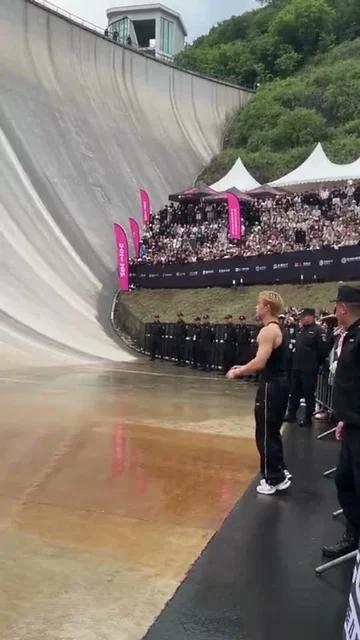











Enable JavaScript in your browser to upload material and generate a video.
Paid credits required. Check the cost before generating.
Preview unavailable. Try again.
What happens in this video?
The giant ramp climbing trend, also searched as dam wall run or dam sprint, is an exaggerated AI stunt in one continuous moving shot. The lead accelerates up a towering curved wall, flips near the top, slides down through water spray and celebrates close to the lens. This template follows that complete action sequence and the upward-then-downward camera movement, with your photo defining the runner.
Your photos and the prepared scene
Upload one photo for the runner. The prepared video supplies the wall, spectators, stunt timing and camera path; your image supplies the face, body, species and clothing. Both distant action and the final close-up should keep that identity. Optional instructions can change light, styling or scene details. No reference video upload is needed.
Choose photos for the right roles
Use one clear full-body photo with the face, feet and arms or front paws visible. A sharp front-facing face is especially useful for the final close-up. Choose the clothes you want in the stunt, avoid group photos and leave room around the body. A pet retains its own body and markings.
Create my video
Add your photos
Use one clear full-body photo with the face, feet and arms or front paws visible. A sharp front-facing face is especially useful for the final close-up. Choose the clothes you want in the stunt, avoid group photos and leave room around the body. A pet retains its own body and markings.
Personalize the scene
Upload one photo for the runner. The prepared video supplies the wall, spectators, stunt timing and camera path; your image supplies the face, body, species and clothing. Both distant action and the final close-up should keep that identity. Optional instructions can change light, styling or scene details. No reference video upload is needed.
Generate and download
Check the credit cost, generate, then inspect faces, hands and transitions before downloading. New generations and revisions use credits.
Questions about this effect
Which photos should I upload?
Use one clear full-body photo with the face, feet and arms or front paws visible. A sharp front-facing face is especially useful for the final close-up. Choose the clothes you want in the stunt, avoid group photos and leave room around the body. A pet retains its own body and markings.
Do I need to upload a reference video?
Upload one photo for the runner. The prepared video supplies the wall, spectators, stunt timing and camera path; your image supplies the face, body, species and clothing. Both distant action and the final close-up should keep that identity. Optional instructions can change light, styling or scene details. No reference video upload is needed.
Does the video include sound?
With sound enabled, the matching audio is extracted from the prepared video and added after silent visual generation. A silent request leaves it out. Exact beat alignment can vary.
How long is the video?
One 15-second 9:16 MP4. Check the face, body movement and scene continuity before downloading. New generations and revisions use credits.
Can I change the outfit or background?
Yes. Add a short instruction about clothing, lighting or the setting. Keep the assigned photo roles for the selected scene.