 Rapframe
Hold Up Dance AI Generator for the Baby Face Dance
Turn one full-body photo into the Hold Up Dance, also called the Baby Face Dance. Do the sharp kicks, drop into a squat, then bend low on the beat.
Create my video
Upload your photos to use this template.
Pick an effect
All 235 effects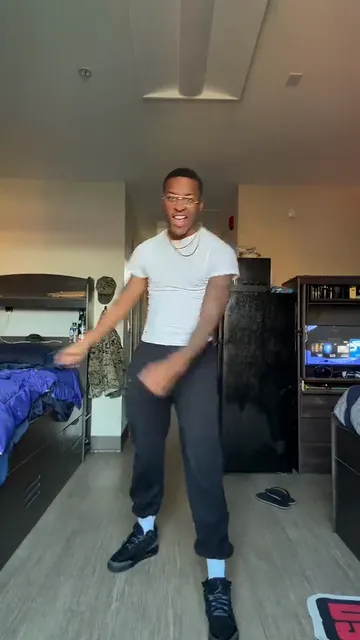











Enable JavaScript in your browser to upload material and generate a video.
Paid credits required. Check the cost before generating.
Preview unavailable. Try again.
What happens in the reference clip?
One dancer kicks out and swings their arms, then widens their stance and brings both hands to their head. A low squat leads into a sharp sideways bend and a step toward the camera.
Does the video include sound?
The finished clip keeps the original dance sound. You can also request a silent version.
Which photos should I add?
Choose a clear photo of one person standing head to toe. Leave room around their arms and feet so the kicks and low bend stay in frame.
Create my video
Add your photos
Turn one full-body photo into the Hold Up Dance, also called the Baby Face Dance. Do the sharp kicks, drop into a squat, then bend low on the beat.
Personalize the scene
Yes. Add a short instruction about clothing, lighting or the setting. Keep the assigned photo roles for the selected scene.
Generate and download
Check that the dancer stays in frame through the squat and the bend, then download your clip.
Questions about this video
Is this the same dance as Baby Face Dance?
Yes. Baby Face Dance and Don’t Play Around Bend are names for this Hold Up Dance routine. The hands-to-head squat and the low sideways bend are the moves to look for.
Do I need to upload a reference video?
No. The scene and movement are already included. Upload the required photos and add optional instructions.
Does the video include sound?
The finished clip keeps the original dance sound. You can also request a silent version.
How long is the video?
≈ 13 s · 9:16
Can I change the outfit or background?
Yes. Add a short instruction about clothing, lighting or the setting. Keep the assigned photo roles for the selected scene.