 Rapframe
Love Options Dance AI Video Generator – BESTie Duet & Pets
Make a 15-second Love Options dance video with you and a friend or two pets. Choose a version and add one photo for each dancer.
Create my video
Upload your photos to use this template.
Pick an effect
All 235 effects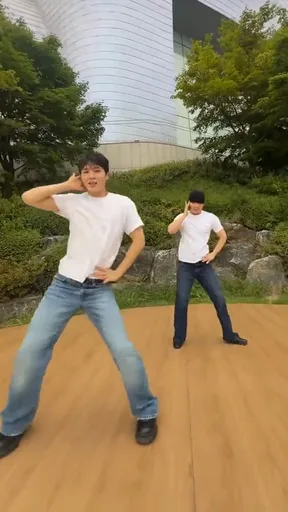











Enable JavaScript in your browser to upload material and generate a video.
Paid credits required. Check the cost before generating.
Preview unavailable. Try again.
What happens in the reference clip?
The Love Options dance follows the “dudududu” chorus of BESTie’s 2013 song, also called 연애의 조건. The human duet pairs side steps with gestures beside the face and quick wrist flicks. The pet duet follows the beat with upright paw moves.
How does the original audio work?
The matching soundtrack is added when sound is enabled. Request a silent video to leave it out.
Which photos should I add?
Use a separate photo for each dancer or pet. Choose clear, full-body photos so faces, arms or paws, and feet are visible. For the human duet, add the front-left dancer first. For pets, add the back-left pet first.
Create my video
Add your photos
Make a 15-second Love Options dance video with you and a friend or two pets. Choose a version and add one photo for each dancer.
Personalize the scene
Yes. Add a short instruction about clothing, lighting or the setting. Keep the assigned photo roles for the selected scene.
Generate and download
Preview the movement with sound, then download your clip.
Questions about this video
Can I use two photos of the same pet?
Yes. Choose Pet duo and add two clear photos, one for each position. Use a different pet in each slot if you want two distinct dancers.
Do I need to upload a reference video?
No. The scene and movement are already included. Upload the required photos and add optional instructions.
Does the video include sound?
The matching soundtrack is added when sound is enabled. Request a silent video to leave it out.
How long is the video?
≈ 15 s · 9:16
Can I change the outfit or background?
Yes. Add a short instruction about clothing, lighting or the setting. Keep the assigned photo roles for the selected scene.