 Rapframe
I Just Beat The Case AI — Courthouse celebration from one photo
Walk out, grin at the camera and celebrate all the way down the walkway. One photo becomes the lead in a playful courthouse-exit meme, with a flex, bouncing kicks and a final fist pump.
Create my video
Upload your photos to use this template.
Pick an effect
All 235 effects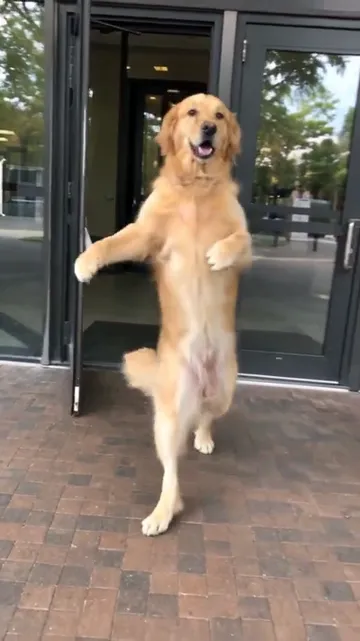











Enable JavaScript in your browser to upload material and generate a video.
Paid credits required. Check the cost before generating.
Preview unavailable. Try again.
What is I Just Beat The Case AI?
I Just Beat The Case AI is the celebratory walkout meme, also searched as Beat The Case AI or I’m Back dance. The visual joke is a confident character leaving glass doors and immediately turning the walkway into a victory dance. The sequence moves from a direct-to-camera gesture to an exaggerated flex, alternating skip-kicks past columns and a bouncing return. Your photo supplies the protagonist, including visible clothing and hair or fur. This is a fictional meme scene, not a record of an actual court case.
Your photos and the scene
A fixed written shot script directs the action; no reference video or storyboard is sent to the model. The camera backs away as the subject exits, then pans alongside the skip-kicks and follows the return. Short timing cues keep the gestures in order, while your photo defines appearance. You can ask for a different outfit, light or location. Motion is a new interpretation, so exact choreography and word-level lip sync can vary.
Choose clear photos
Upload one sharp full-body photo with the face and limbs visible. Leave room around hands or paws and feet. A clear standing portrait is easier to follow through the doorway, flex and wide kicks than a tightly cropped selfie. Avoid group pictures, blurred legs and heavy filters. Pet photos keep the animal’s identity and adapt the gestures to its body.
Create my video
Add your photos
Upload one sharp full-body photo with the face and limbs visible. Leave room around hands or paws and feet. A clear standing portrait is easier to follow through the doorway, flex and wide kicks than a tightly cropped selfie. Avoid group pictures, blurred legs and heavy filters. Pet photos keep the animal’s identity and adapt the gestures to its body.
Personalize the scene
A fixed written shot script directs the action; no reference video or storyboard is sent to the model. The camera backs away as the subject exits, then pans alongside the skip-kicks and follows the return. Short timing cues keep the gestures in order, while your photo defines appearance. You can ask for a different outfit, light or location. Motion is a new interpretation, so exact choreography and word-level lip sync can vary.
Generate and download
Review the displayed cost, then generate. Check faces, hands, motion and sound before downloading. New generations and revisions use paid credits.
Questions about this video
How many photos do I need?
Upload one sharp full-body photo with the face and limbs visible. Leave room around hands or paws and feet. A clear standing portrait is easier to follow through the doorway, flex and wide kicks than a tightly cropped selfie. Avoid group pictures, blurred legs and heavy filters. Pet photos keep the animal’s identity and adapt the gestures to its body.
Do I need to upload a reference video?
A fixed written shot script directs the action; no reference video or storyboard is sent to the model. The camera backs away as the subject exits, then pans alongside the skip-kicks and follows the return. Short timing cues keep the gestures in order, while your photo defines appearance. You can ask for a different outfit, light or location. Motion is a new interpretation, so exact choreography and word-level lip sync can vary.
Does the video include sound?
The matching soundtrack is added when sound is enabled. Request a silent video to leave it out.
How long is the video?
13 seconds, vertical 9:16 MP4. Sound is optional; exact lip sync is not guaranteed.
Can I change the outfit or background?
Yes. Add a short instruction about clothing, lighting or the setting. Keep the assigned photo roles for the selected scene.