 Rapframe
End of Watch AI Video Generator
Make the End of Watch AI locker-room scene from one or two portraits. Cast the foreground lead and an optional partner in an 11-second vertical video.
Make my End of Watch video
Upload your photos to use this template.
Pick an effect
All 235 effects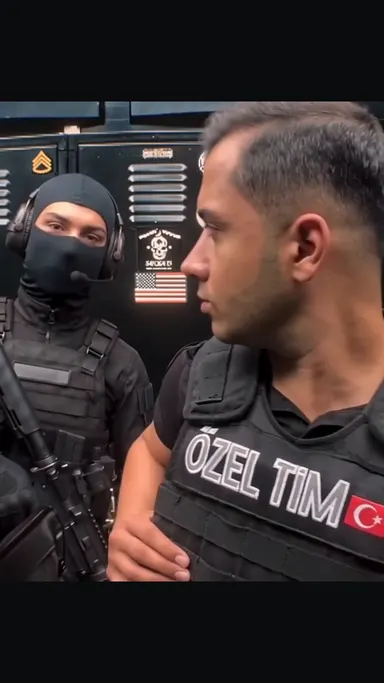











Enable JavaScript in your browser to upload material and generate a video.
Paid credits required. Check the cost before generating.
Preview unavailable. Try again.
What happens in the locker room?
The lead glances at the partner by the lockers and turns back to the camera. A flashlight flare crosses the lens, followed by a series of quick gear close-ups.
Which photo goes in each role?
The first adult portrait plays the lead nearest the lens. The optional second portrait plays the partner behind them on screen left. Upload one clear adult per photo. With one upload, a fictional adult fills the partner role.
Add your photos
The first adult portrait plays the lead nearest the lens. The optional second portrait plays the partner behind them on screen left. Upload one clear adult per photo. With one upload, a fictional adult fills the partner role.
Make my End of Watch video
Add your photos
The first adult portrait plays the lead nearest the lens. The optional second portrait plays the partner behind them on screen left. Upload one clear adult per photo. With one upload, a fictional adult fills the partner role.
Personalize the scene
No. The scene and movement are already included. Upload the required photos and add optional instructions.
Generate and download
Check both faces around the turn and light flare, then watch the hands during the closing close-ups before downloading.
Questions about this video
Which photo goes in each role?
The first adult portrait plays the lead nearest the lens. The optional second portrait plays the partner behind them on screen left. Upload one clear adult per photo. With one upload, a fictional adult fills the partner role.
Do I need to upload a reference video?
No. The scene and movement are already included. Upload the required photos and add optional instructions.
Does the video include sound?
The matching soundtrack is added when sound is enabled. Request a silent video to leave it out.
How long is the video?
The locker-room scene is 11 seconds long and vertical (9:16).
Can I change the outfit or background?
Yes. Add a short instruction about clothing, lighting or the setting. Keep the assigned photo roles for the selected scene.