 Rapframe
Just a Little Bit AI — Three-photo plaza dance
Just a Little Bit AI: Three-photo plaza dance. Use 3 separate photos, one subject per image. A 15-second 9:16 video; matching source sound is optional.
Create my video
Upload your photos to use this template.
Pick an effect
All 235 effects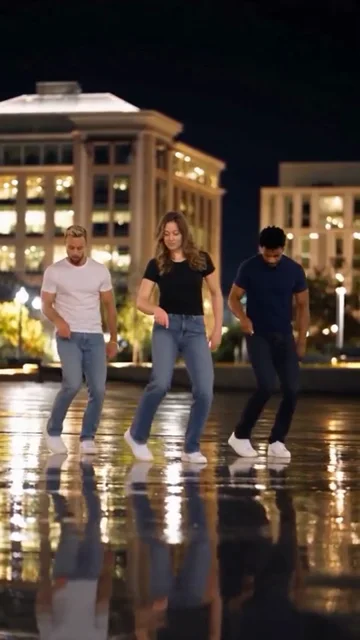











Enable JavaScript in your browser to upload material and generate a video.
Paid credits required. Check the cost before generating.
Preview unavailable. Try again.
What is Just a Little Bit AI?
Three dancers share a reflective night plaza in a continuous wide shot. The selected excerpt follows synchronized weight shifts, bent-knee side steps, hip accents and forearm gestures. Photos map to the opening left, center and right dancers, keeping three separate faces throughout.
Your photos and the prepared scene
Your photos define the cast, including faces, natural bodies, hair or fur and visible clothing. The included video guides only the prepared action, shot order and camera timing. No video upload is needed. Leave instructions blank for the default scene, or request a setting, lighting or outfit change while keeping the assigned roles. AI motion and fine details can vary.
Choose photos for the right roles
Upload 3 separate, sharp photos, one subject in each, following the role order. Show faces, bodies and limbs clearly; avoid group photos and heavy filters. Reverse the relevant photo order to swap roles. Photo roles: Plaza left dancer / Plaza center dancer / Plaza right dancer.
Create my video
Add your photos
Upload 3 separate, sharp photos, one subject in each, following the role order. Show faces, bodies and limbs clearly; avoid group photos and heavy filters. Reverse the relevant photo order to swap roles. Photo roles: Plaza left dancer / Plaza center dancer / Plaza right dancer.
Personalize the scene
Your photos define the cast, including faces, natural bodies, hair or fur and visible clothing. The included video guides only the prepared action, shot order and camera timing. No video upload is needed. Leave instructions blank for the default scene, or request a setting, lighting or outfit change while keeping the assigned roles. AI motion and fine details can vary.
Generate and download
Check the credit cost, generate, then inspect faces, hands and transitions before downloading. New generations and revisions use credits.
Questions about this effect
Which photos should I upload?
Upload 3 separate, sharp photos, one subject in each, following the role order. Show faces, bodies and limbs clearly; avoid group photos and heavy filters. Reverse the relevant photo order to swap roles. Photo roles: Plaza left dancer / Plaza center dancer / Plaza right dancer.
Do I need to upload a reference video?
Your photos define the cast, including faces, natural bodies, hair or fur and visible clothing. The included video guides only the prepared action, shot order and camera timing. No video upload is needed. Leave instructions blank for the default scene, or request a setting, lighting or outfit change while keeping the assigned roles. AI motion and fine details can vary.
Does the video include sound?
With sound enabled, the matching audio is extracted from the prepared video and added after silent visual generation. A silent request leaves it out. Exact beat alignment can vary.
How long is the video?
One 15-second MP4 in 9:16. The included reference and matching audio use the same selected excerpt.
Can I change the outfit or background?
Yes. Add a short instruction about clothing, lighting or the setting. Keep the assigned photo roles for the selected scene.