 Rapframe
Like JENNIE AI Dance · Lead the Crew
Make a Like JENNIE AI dance video from one photo. Lead a black-clad crew in a white studio, with close-ups and an overhead finish. 10 seconds, 9:16.
Make my video
Upload your photos to use this template.
Pick an effect
All 235 effects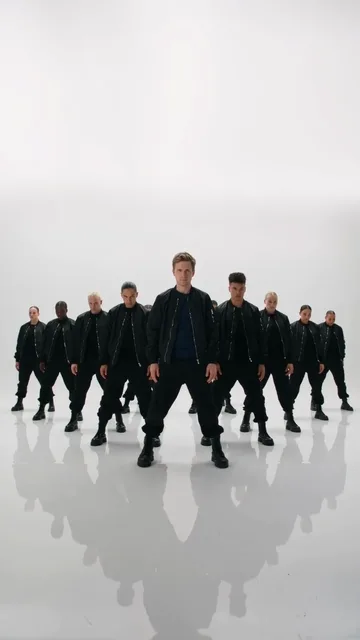











Enable JavaScript in your browser to upload material and generate a video.
Paid credits required. Check the cost before generating.
Preview unavailable. Try again.
What is this video trend?
Like JENNIE AI puts your photo at the front of a pop dance crew. The scene moves from a full-body formation into a playful close-up, then a low group bounce and a circle seen from above. A bright white studio and coordinated black outfits give the performance its clean music-video look. Your lead keeps the face, hair and clothing from your upload; the surrounding dancers are supporting characters.
Your photo, your version
Upload one photo and leave instructions blank for the included white-studio performance. The preset directs the movement and camera changes without a reference video or storyboard. You can request different lighting, clothing or a location while keeping one clear lead. This is a new interpretation, so precise choreography and facial detail may differ from the preview.
Choose photos that show the action
Use one sharp photo of one subject with the face, arms and preferably the whole body visible. Leave room around the shoes and hands. Avoid group photos, hidden faces and heavy filters; a distinctive outfit helps the lead stand apart from the black-clad crew.
Make my video
Add your photos
Use one sharp photo of one subject with the face, arms and preferably the whole body visible. Leave room around the shoes and hands. Avoid group photos, hidden faces and heavy filters; a distinctive outfit helps the lead stand apart from the black-clad crew.
Personalize the scene
Upload one photo and leave instructions blank for the included white-studio performance. The preset directs the movement and camera changes without a reference video or storyboard. You can request different lighting, clothing or a location while keeping one clear lead. This is a new interpretation, so precise choreography and facial detail may differ from the preview.
Generate and download
Review the displayed credit cost, then generate. Check faces, hands, footwork, camera motion and sound before downloading the MP4. New generations and revisions use paid credits.
Questions about this video
Which photos should I upload?
Use one sharp photo of one subject with the face, arms and preferably the whole body visible. Leave room around the shoes and hands. Avoid group photos, hidden faces and heavy filters; a distinctive outfit helps the lead stand apart from the black-clad crew.
Do I need to upload a reference video?
Upload one photo and leave instructions blank for the included white-studio performance. The preset directs the movement and camera changes without a reference video or storyboard. You can request different lighting, clothing or a location while keeping one clear lead. This is a new interpretation, so precise choreography and facial detail may differ from the preview.
Does the video include sound?
The matching soundtrack is added when sound is enabled. Request a silent video to leave it out.
How long is the video?
10 seconds, vertical 9:16 MP4. Matching source sound is optional. Movement and lip synchronization can vary.
Can I change the outfit or background?
Yes. Add a short instruction about clothing, lighting or the setting. Keep the assigned photo roles for the selected scene.