 Rapframe
Make a Mellojoy AI Dance Video from One Photo
Turn a solo photo into a 15-second dance with playful hand gestures, side-to-side sways and a steady camera.
Make my Mellojoy dance
Upload your photos to use this template.
Pick an effect
All 235 effects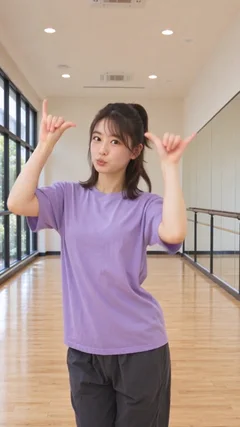











Enable JavaScript in your browser to upload material and generate a video.
Paid credits required. Check the cost before generating.
Preview unavailable. Try again.
What is the Mellojoy dance?
This take on the Japanese Mellojoy dance challenge (メロジョイダンス) starts with open arms and moves through quick wrist accents and playful gestures by the cheeks, all in a single shot.
Dance in the setting from your photo
The video uses the background from your photo. For a dance studio look like the example, pick a photo taken in a studio. Add an optional note if you want to personalize the shot.
Pick one clear solo photo
Choose one person facing the camera with their face and upper body clearly visible.
How to make a Mellojoy dance video
Add your photos
Choose one person facing the camera with their face and upper body clearly visible.
Personalize the scene
The video uses the background from your photo. For a dance studio look like the example, pick a photo taken in a studio. Add an optional note if you want to personalize the shot.
Generate and download
Check the credit cost, then generate and review the face, gestures and framing before downloading.
Questions about this video
What photo should I upload?
Choose one person facing the camera with their face and upper body clearly visible.
Do I need to upload a reference video?
No. The scene and movement are already included. Upload the required photos and add optional instructions.
Does the Mellojoy dance video include the original sound?
The video is silent. You can add your own music after downloading.
How long is the video?
The video is 15 seconds long and uses a vertical 9:16 frame.
Can I change the outfit or background?
Yes. Add a short instruction about clothing, lighting or the setting. Keep the assigned photo roles for the selected scene.