 Rapframe
Musubi Dance AI Generator
Make a 14-second Musubi dance duet from two full-body photos. Add the dancer who starts on the left first, then the dancer on the right.
Make your Musubi dance duet
Upload your photos to use this template.
Pick an effect
All 235 effects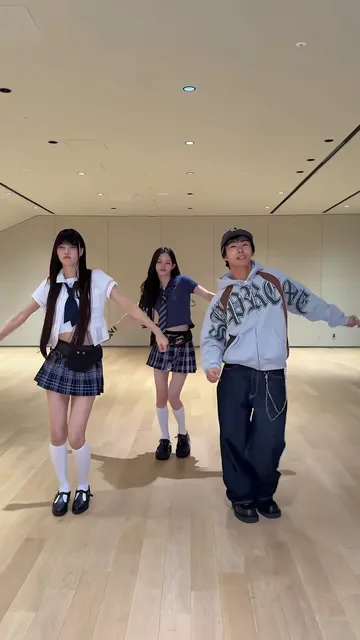











Enable JavaScript in your browser to upload material and generate a video.
Paid credits required. Check the cost before generating.
Preview unavailable. Try again.
What is the Musubi dance?
Ayumu Imazu’s 結び (Musubi) dance pairs small side steps and weight shifts with synchronized arm lifts. This duet follows the two outside dancers in a single wide shot so you can see both dancers’ feet and hands.
From the original trio to your duet
The reference preview shows the original trio. Your two photos fill the left and right roles in the duet.
Choose two clear full-body photos
Use one person per photo, with their head, hands and shoes visible. A front-facing pose and a clear outline around each person make the movements easier to see.
Make your Musubi dance duet
Add your photos
Use one person per photo, with their head, hands and shoes visible. A front-facing pose and a clear outline around each person make the movements easier to see.
Personalize the scene
Check the left and right assignments. If you want a different setting or lighting, add a short note.
Generate and download
After generating, check both faces, the side steps and the timing of the arm lifts. Download the vertical clip when you’re happy with it.
Questions about this video
Which photo goes first?
Photo 1 is the dancer on the viewer’s left at the start. Photo 2 is the dancer on the right.
Do I need to upload a reference video?
Choose your two full-body photos. You can leave the optional notes blank.
Does the video include sound?
The reference preview plays the original soundtrack. Your download includes the same track by default.
How long is the video?
The duet is a 14-second vertical video.
Can I change the outfit or background?
Yes. Add a short instruction about clothing, lighting or the setting. Keep the assigned photo roles for the selected scene.