 Rapframe
Tamagawa Koi Dance AI for Two Cats
Turn two cat photos into a 15-second Tamagawa Koi dance with pink outfits and matching paw hearts.
Create my video
Upload your photos to use this template.
Pick an effect
All 235 effects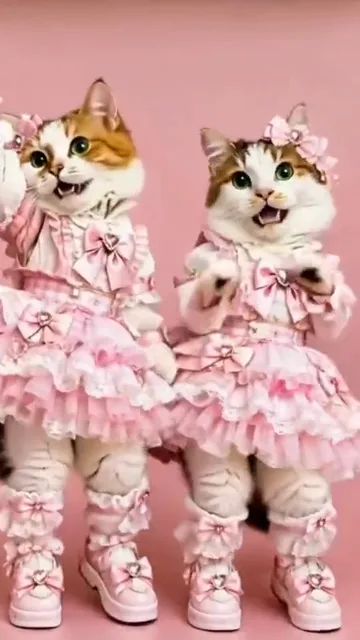











Enable JavaScript in your browser to upload material and generate a video.
Paid credits required. Check the cost before generating.
Preview unavailable. Try again.
What happens in the reference clip?
The duet follows the dance to 多摩川で、恋…したい♡. The cats make hearts at chest height, lift their outside paws, turn inward and bring their paws together overhead.
Does the video include sound?
With sound on, your video uses the audio from the selected preview, aligned from the start.
Which photos should I add?
Choose a clear photo of each cat with its face and coat visible. Upload the cat that starts on the left first.
Create my video
Add your photos
Turn two cat photos into a 15-second Tamagawa Koi dance with pink outfits and matching paw hearts.
Personalize the scene
Yes. Add a short instruction about clothing, lighting or the setting. Keep the assigned photo roles for the selected scene.
Generate and download
Check the movement and sound, then download your clip.
Questions about this video
Which photo goes on each side?
Photo 1 is the cat on the viewer’s left at the start. Photo 2 is the cat on the viewer’s right.
Do I need to upload a reference video?
No. The scene and movement are already included. Upload the required photos and add optional instructions.
Does the video include sound?
With sound on, your video uses the audio from the selected preview, aligned from the start.
How long is the video?
≈ 15 s · 9:16
Can I change the outfit or background?
Yes. Add a short instruction about clothing, lighting or the setting. Keep the assigned photo roles for the selected scene.