 Rapframe
Goodbye GTA 5 AI Video Generator
Make the Goodbye GTA 5 AI farewell with one portrait. Star in the sunset pier close-up, get behind the wheel and drive down the palm-lined coast.
Make my Goodbye GTA 5 video
Upload your photos to use this template.
Pick an effect
All 235 effects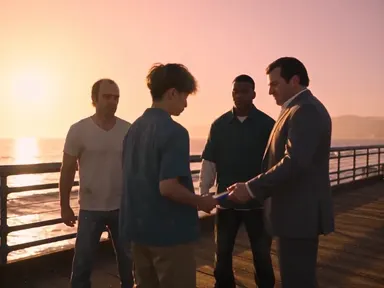











Enable JavaScript in your browser to upload material and generate a video.
Paid credits required. Check the cost before generating.
Preview unavailable. Try again.
What happens in the sunset farewell?
The full scene opens with the greetings and a case and key handoff on the pier. A friend puts a hand on your shoulder before the tearful close-up. Then you get into the pink car and drive off along the coast.
Which person does my photo replace?
Your photo casts the departing traveler. The three friends stay in supporting roles. Choose one sharp, well-lit adult portrait with the face and shoulders in view.
Add your photos
Your photo casts the departing traveler. The three friends stay in supporting roles. Choose one sharp, well-lit adult portrait with the face and shoulders in view.
Make my Goodbye GTA 5 video
Add your photos
Your photo casts the departing traveler. The three friends stay in supporting roles. Choose one sharp, well-lit adult portrait with the face and shoulders in view.
Personalize the scene
No. The scene and movement are already included. Upload the required photos and add optional instructions.
Generate and download
Watch for a recognizable face both at the railing and behind the wheel. Check the handoff and the final drive before downloading.
Questions about this video
Which person does my photo replace?
Your photo casts the departing traveler. The three friends stay in supporting roles. Choose one sharp, well-lit adult portrait with the face and shoulders in view.
Do I need to upload a reference video?
No. The scene and movement are already included. Upload the required photos and add optional instructions.
Does the video include sound?
The matching soundtrack is added when sound is enabled. Request a silent video to leave it out.
How long is the video?
The full farewell runs about 30 seconds in a 4:3 landscape frame.
Can I change the outfit or background?
Yes. Add a short instruction about clothing, lighting or the setting. Keep the assigned photo roles for the selected scene.