 Rapframe
TXT Angel Bite Dance AI Video Generator
Make the 15-second TXT Angel Bite dance with one full-body photo for a solo or two for a duet.
Create my video
Upload your photos to use this template.
Pick an effect
All 235 effects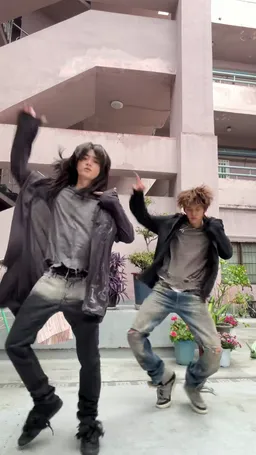











Enable JavaScript in your browser to upload material and generate a video.
Paid credits required. Check the cost before generating.
Preview unavailable. Try again.
What happens in the reference clip?
The dancers start with their backs to the camera, turn together, lean back and drop into wide steps. Watch them lift an arm, rebound through the footwork and end by covering the lens. The full official preview includes a slightly longer opening.
How does the original audio work?
The matching soundtrack is added when sound is enabled. Request a silent video to leave it out.
Which photos should I add?
Use a separate, clear full-body photo for each dancer, with their face, hands and shoes in frame. For a duet, the two photo slots follow the dancers’ positions at the start, as seen from the camera.
Create my video
Add your photos
Make the 15-second TXT Angel Bite dance with one full-body photo for a solo or two for a duet.
Personalize the scene
Yes. Add a short instruction about clothing, lighting or the setting. Keep the assigned photo roles for the selected scene.
Generate and download
Preview the movement with sound, then download your clip.
Questions about this video
Can I make the dance with just one photo?
Yes. Choose Solo to dance alone or Duet to use one photo for the front-left dancer and one for the back-right dancer.
Do I need to upload a reference video?
No. The scene and movement are already included. Upload the required photos and add optional instructions.
Does the video include sound?
The matching soundtrack is added when sound is enabled. Request a silent video to leave it out.
How long is the video?
≈ 15 s · 9:16
Can I change the outfit or background?
Yes. Add a short instruction about clothing, lighting or the setting. Keep the assigned photo roles for the selected scene.